Supported AI agents' memory,
in one place you control.
scritty is a terminal emulator. Run a supported AI CLI inside it; scritty detects the agent, captures each turn it can attribute -- the prompt scritty submitted and the output the pane wrote afterwards -- tags it with the provider, and indexes it for search. Then it serves that memory back -- to your agents over MCP, and to you over the CLI. On Linux, set it as your system's default terminal, and every shell your desktop, editor, or file manager opens is already scritty -- already capturing. On Windows, register it as your per-user Default Terminal Application and normal non-elevated console launches open as scritty tabs. macOS has no system default-terminal hook; launch scritty and run agents inside it. Your captures stay on your machine. No copy-paste, no per-vendor silos. One agent gives you a searchable memory of your own work; every supported agent you add shares the same corpus.
Four agents. One memory.
Copilot, Codex, Claude Code, and Antigravity run on one project and share memory across sessions; then the same memory is searched from the terminal panel and the CLI, synced to a browser and a paired phone, run offline with local Ollama models, and federated into an operator control plane with per-tenant isolation and audited admin overrides.
Context dies at the boundary between tools.
one project.
Claude for architecture, Codex for tests, Copilot for boilerplate, Antigravity for research, Ollama on a plane. Every tool is its own silo, and none of them know what the others said.
You re-explain decisions. You repeat yourself. You lose work.
- Each vendor keeps its own log, in its own format, in its own silo.
- No cross-agent search. No embeddings. No shared corpus.
- The decision your Claude session made is invisible to Codex.
- So you paste context between tools by hand, or just lose it.
One process. Two live views.
The desktop terminal embeds a token-secured web server. Open that URL in any browser -- on the same machine or another device on your network -- and you are looking at the exact same PTY and the same memory panel. Type on the desktop and the browser updates; type in the browser and the desktop updates. One process, two views, byte-for-byte in sync.

- A per-session bearer token rides in the URL; nothing is shared until you hand out the link.
- Install it as a desktop PWA (Chrome / Edge "Install app") -- a standalone window, no browser chrome.
- A trusted cert unlocks secure-context features, so the browser treats it like a first-class app.
- The browser is not a read-only mirror: it drives the same session, memory, and search as the desktop.
Start on your desktop. Continue on your phone.
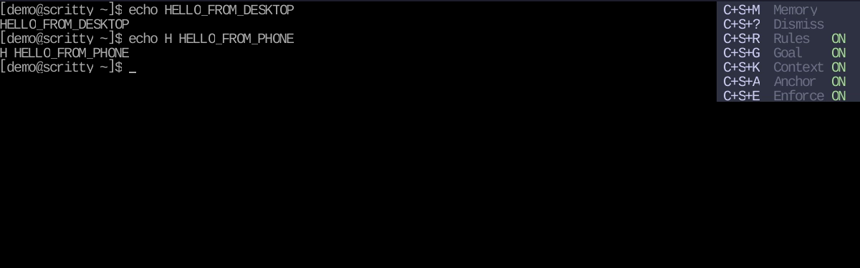
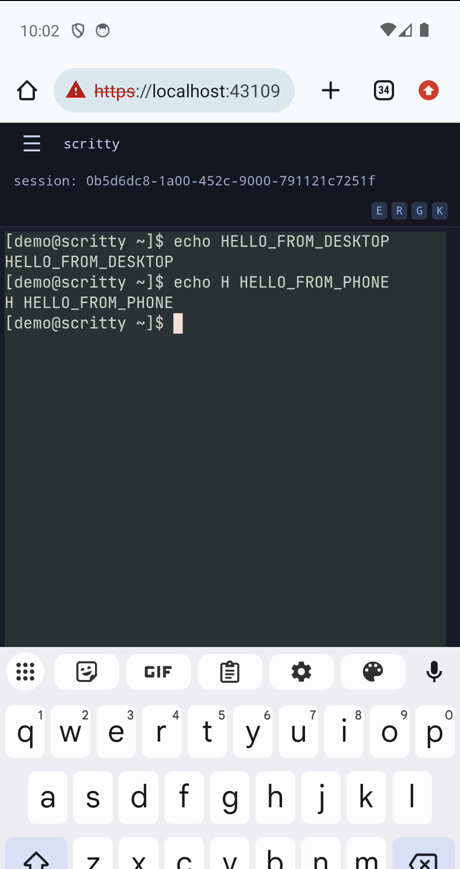
The web listener accepts only loopback clients by default; every other source receives a 403 before routing. First start a Tailscale Funnel to https+insecure://localhost:3000. Then either set SCRITTY_WEB_PUBLIC_URL before launching scritty and scan its startup QR, or run the explicitly scoped scritty pair command below with --admin or --sessions plus --origin. Both paths use the same CA-trusted Funnel origin. Widen SCRITTY_WEB_BIND_ALLOW only for direct LAN access. Drop the connection and it reconnects on its own.
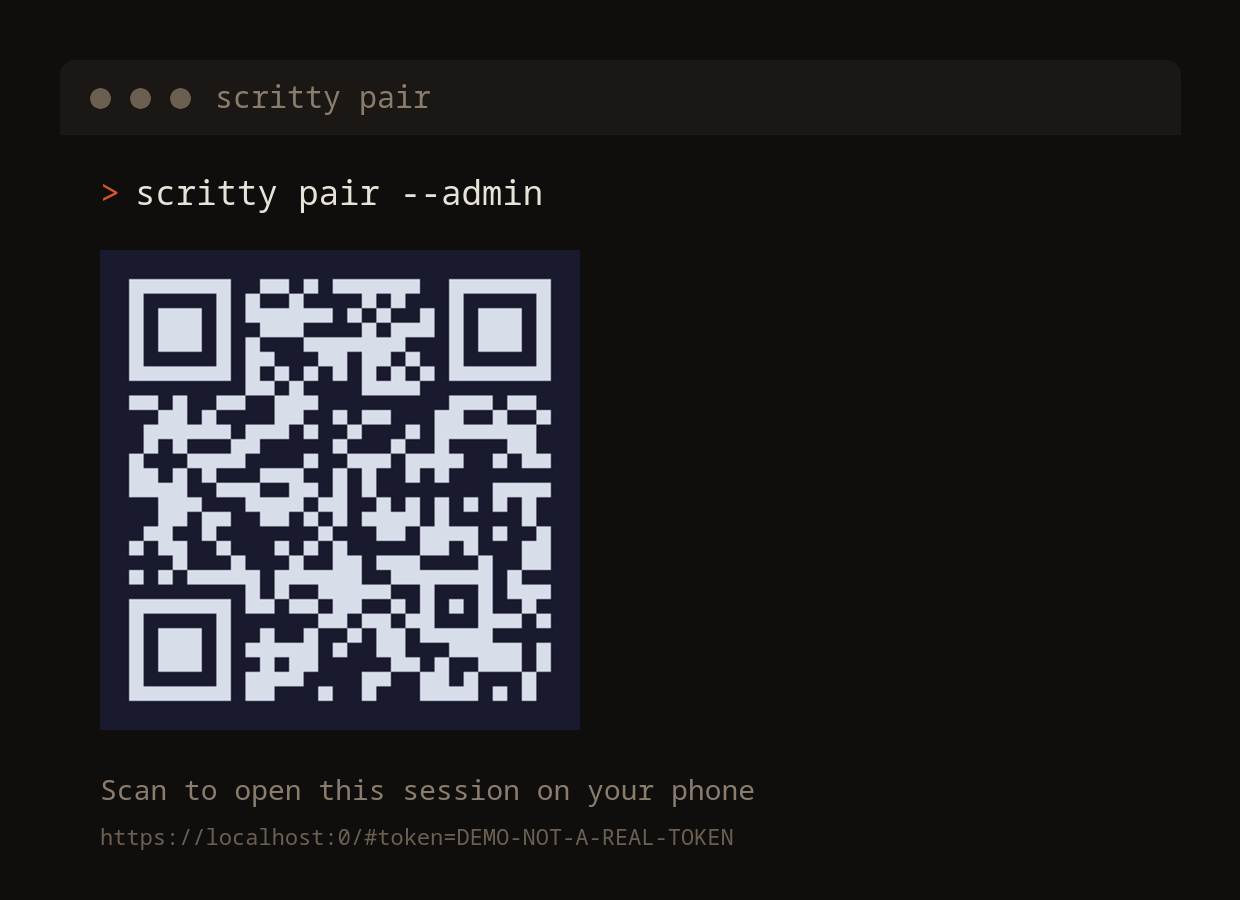
- Pair after the explicit Funnel opt-in; tailscaled reaches scritty over loopback and supplies the trusted public cert.
- Add to Home Screen on iOS or Android; offline-aware, auto-reconnects when scritty comes back.
- The mobile UI adapts: touch-friendly targets, a full-width exploration panel, swipe to scroll the live terminal.
- Drive the session from the phone -- keystrokes reach the same PTY as the desktop, not a read-only view.
- Search every agent and session from your phone, the same corpus as the desktop.
- Locked down by default: TLS is always on (no plain-HTTP mode), every connection is bearer-token gated with only the token's hash stored, a CIDR allowlist sits in front, and reaching it from any other device takes an explicit opt-in.
Once configured, monitor a long-running agent from the couch, review output on the train, or send a prompt from the paired phone.
How it works, in one line.
# Monday   Claude refactors auth middleware    -> captured
# Tuesday  Codex writes tests for the refactor -> captured
# WednesdayCopilot scaffolds the API routes    -> captured
# Thursday Antigravity researches OAuth2 PKCE  -> captured
# Friday   Ollama (offline) ties it together   -> captured

search> auth decisions
  14 matches / 5 sessions / 5 providers / one unified view
  same results on your phone, laptop, or any browser
The terminal is the one boundary every CLI agent has to cross. scritty captures supported providers there without vendor cooperation -- only a provider entry -- and the corpus is yours.
Your rules. Every supported agent. Every message.
Capture is the inbound half. On the way out, scritty assembles every message before it reaches the agent: it folds in your standing instructions, enforcement rules, the current goal, and the provider's own rule file -- so the same rules apply whether you're in Claude, Codex, Copilot, or Antigravity.
- Write your instructions once in prompt.toml; stop re-typing and re-pasting them into every tool.
- Reads each vendor's native rule file too: .claude/CLAUDE.md, AGENTS.md, copilot-instructions.md, GEMINI.md.
- Every section toggles live from the terminal -- flip a rule off for one message, back on for the next.
- Then press Ctrl+Shift+M to query your whole substrate inline, without leaving the terminal.
Your standing instructions from prompt.toml -- written once, applied to every supported agent.
Hard constraints that get injected on every send, not politely suggested once.
The current objective, kept in front of the agent so it doesn't drift.
Tone classification and control signals assembled before the message leaves.
Open cross-agent search in a side panel, in the same terminal -- native or browser.
Your agents query the memory. Not just you.
Capture is only half of it. The corpus is a substrate, not a side panel: one engine, reachable three ways. A human at a keyboard, an agent over MCP, and a shell script all read and write the same data with the same behavior.
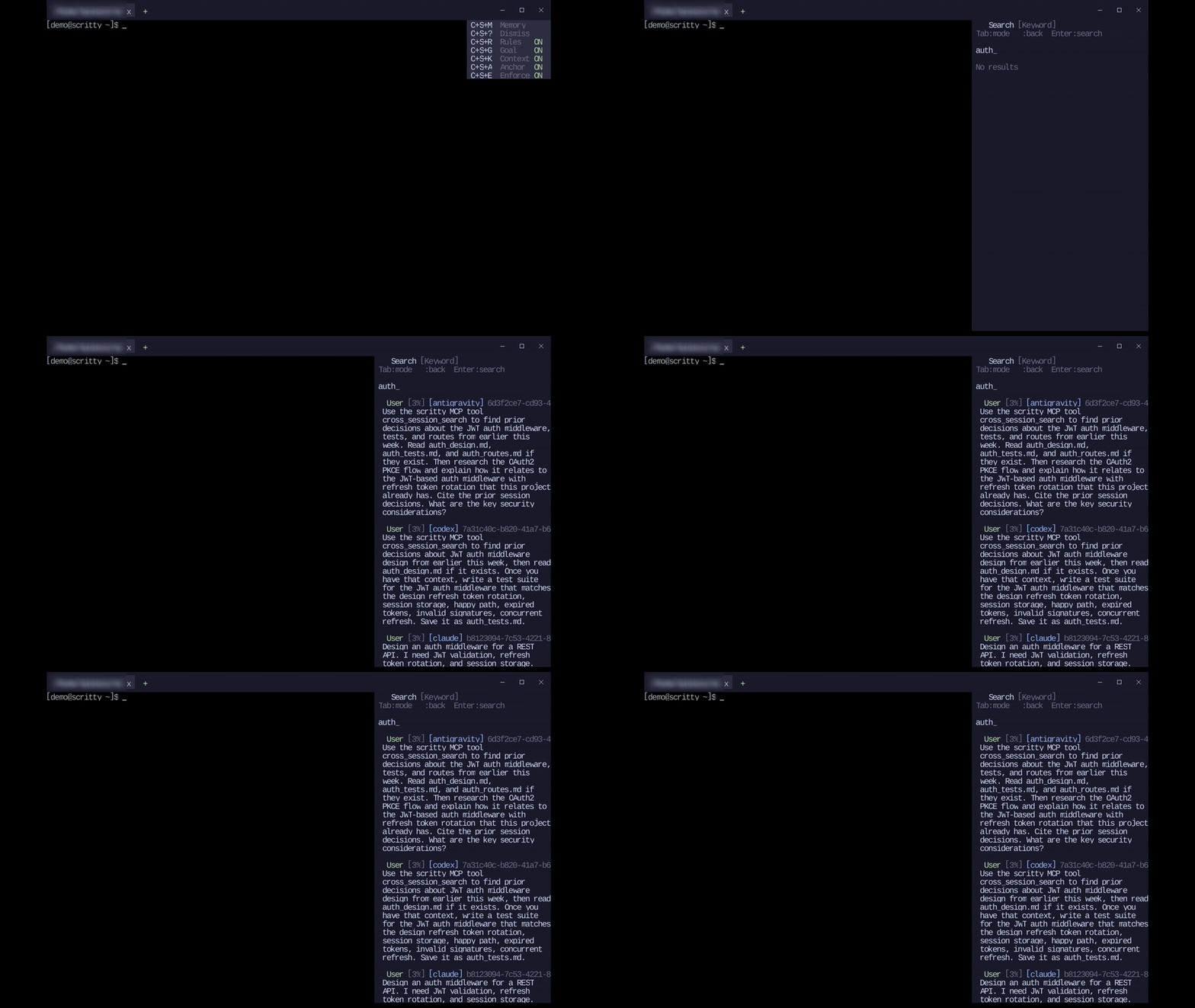
Press Ctrl+Shift+M to search every agent and session inline, without leaving the terminal.
Expose the corpus over MCP -- stdio on every tier, or Streamable HTTP for remote and multi-machine agents with a current Team+ licence. Public HTTP binds require Enterprise. Any agent can search its own and other agents' prior turns.
Scriptable access to the same store -- list, read, and search sessions from any shell or pipeline.
// stdio -- local agents (Claude, Codex, Copilot, ...)
{
  "mcpServers": {
    "scritty": { "command": "scritty", "args": ["serve"] }
  }
}

# Streamable HTTP -- remote / multi-machine agents (current Team+ licence)
$ scritty serve --http --bind 127.0.0.1 --port 8081
  scritty HTTP MCP listening at http://127.0.0.1:8081/mcp
(bearer-token auth, per-tenant routing) $ scritty memory cross-session-search \ --query "auth refactor" --limit 10 14 matches / 5 sessions / 5 providers $ scritty memory read-session --session-id abc-123 every exchange scritty recorded, as text
Terminal, MCP, and CLI share one MemoryService -- same data, same behavior. With a current Team+ licence, the HTTP transport is the standard MCP Streamable HTTP endpoint (/mcp), so any compliant client connects with a bearer token. The corpus is also exposed as MCP resources (memory://sessions, memory://search) for agents that read resources instead of calling tools.
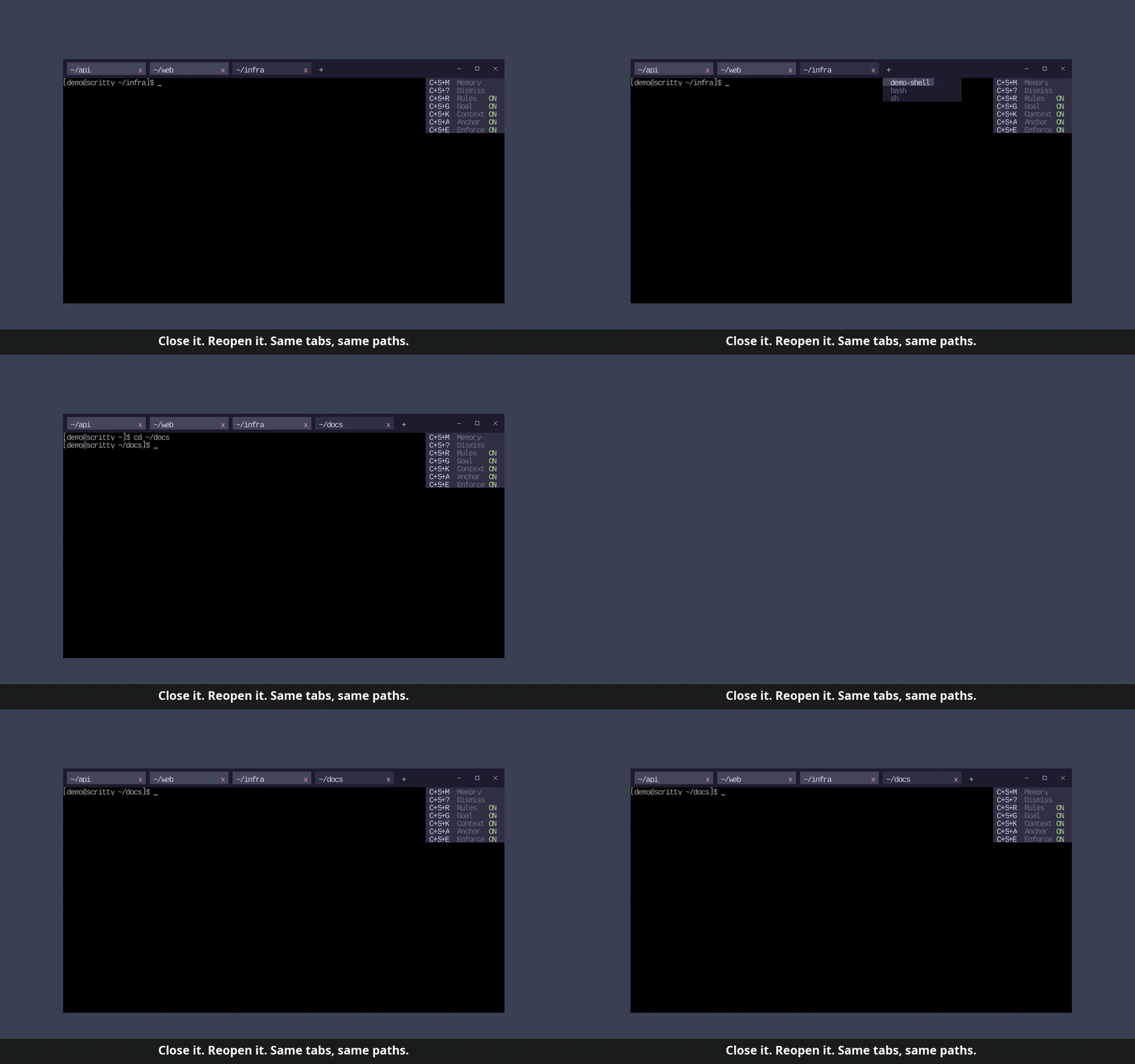
Close it. Reopen it. Right where you left off.
Quit with a dozen tabs open across a dozen projects, and the next launch brings every one back -- each shell already in the directory you left it. Like a browser restoring your tabs, for your terminal.
One agent answers from another agent's session.
Split your tmux window and run a different agent in each pane. scritty captures
them as two separate conversations -- built from the bytes each pane itself
emitted, so a neighbouring pane never leaks into an exchange, and your prefix, copy
mode and popups are untouched. Then it serves that memory back: here Copilot is
asked about fetch.rs, told not to open any files, and answers
from what Antigravity found in the other pane.
The second agent answers from the first agent's work.
Recorded end to end, unedited except for trimming each agent's launch and a
modest speed-up. Copilot designs a JWT auth middleware and writes its notes to a
file. Antigravity is then started in a fresh session, given no context, and told
to use scritty's cross_session_search tool -- it finds Copilot's
decisions and answers on top of them, citing session storage and refresh token
rotation it was never told about.
session:{sid}, user_sessions and RS256 --
Copilot's decisions, from a session it never saw, over MCP.
8 things nothing else does together.
Agent-agnostic capture
The terminal sits upstream of every supported CLI agent. Launch Claude Code, Codex, Copilot CLI, Gemini, Antigravity, Grok, or Ollama and scritty captures attributable turns without vendor cooperation, plugins, or wrappers. Unknown CLIs still run normally but are not auto-captured until a provider entry is added.
Process-level provider detection
It reads the process running in the terminal, not the prompt text, so what you submit through scritty and the output that pane wrote afterwards are recorded together and tagged with the provider that produced them. No prompt sniffing, no heuristics.
Runs inside tmux
scritty works with your multiplexer, not against it. It resolves which tmux client owns its terminal by pty, so capture survives exec tmux, wrappers and aliases -- none of which leave a child process to find. Content is the bytes that pane itself emitted, replayed through a terminal, so a neighbouring pane can never contaminate an exchange, and two agents in two panes are two conversations. Your key bindings are untouched.
One corpus across vendors
Your Claude session about an OAuth bug and your Codex session two weeks later about the same bug live in the same store, in one query.
Hybrid search
Vector plus keyword search fused with Reciprocal Rank Fusion. Dual offline ONNX embeddings, one tuned for code and one for prose. Press Ctrl+Shift+M and search everything.
Pluggable vector backend
A built-in embedded engine by default, or qdrant, pgvector, chroma, weaviate, all behind one trait, with dimension and fingerprint enforcement and atomic blue/green rev swaps.
Yours at rest
Captures stay on your machine, and opt-in at-rest encryption locks the whole local store -- transcript, keyword index, and vector index -- under a passphrase only you hold, so nothing is readable to another process, another agent, or a synced backup. Agents reach memory over scoped tokens, so one can be pinned to a single session and can't widen to the whole corpus.
Honest about what it captured
scritty records the output a pane wrote after a prompt it submitted itself. It does not infer or strip agent UI, so stored text can include prompt echo, progress displays and terminal chrome -- kept because every rule that tried to remove them also removed real answers. Input scritty did not submit is not attributed to a turn. When scritty can name a loss -- a tmux pause, a failed write to its record -- the exchange carries a visible capture gap rather than being presented as complete. A reply taller than the pane keeps the lines that scrolled out of view, including one that scrolls inside a scroll region or is written on the alternate screen. Lines an application deletes outright are not preserved and raise no gap: that is an edit the agent made, not output that went missing, and a marker that cries wolf is one readers learn to ignore.
In the gap nothing else fills.
| You currently use | What it does | What it does not do |
|---|---|---|
| iTerm2 / Alacritty / Windows Terminal | A traditional terminal emulator | Renders a shell, nothing more. No agent detection, no capture, no memory. scritty can be the Linux x-terminal-emulator and the per-user Windows Default Terminal Application for normal non-elevated console launches; macOS has no system default-terminal hook. |
| Warp | Agentic terminal with its own AI | Captures only Warp's own agent. Claude Code, Codex, Antigravity running inside it are invisible. Cloud-tied. |
| Cursor / Continue / Cody | IDE-side AI with codebase indexing | Indexes your code, not your conversations. Lives in an editor, not a terminal. |
| mem0 / Letta / Zep / Cognee | Memory-as-a-service and agent runtimes | A library; you build the agent that uses it. No terminal, no auto-capture, mostly cloud. |
| Per-vendor session logs | Claude Code memory, Codex sessions, Copilot history | Siloed by vendor, one format each, no cross-agent search, no embeddings, no shared corpus. |
| asciinema / ttyrec / script(1) | Terminal recorders | Capture bytes. No agent detection, no parsing, no semantic search. |
| tmux / screen | Terminal multiplexers | Not a competitor -- scritty runs with tmux. It resolves the owning client, spools each pane's emitted bytes, replays them through a per-pane terminal, and records agents in separate panes as separate conversations. |
| scritty | Supported CLI agents captured at the terminal, into one searchable corpus you control | Bring its own agent or model. It captures the ones you already run. |
scritty sits between AI terminals (which own the surface but not cross-agent memory) and agent memory layers (which own memory but make you build the agent). It is the only one that captures supported CLI agents at the OS boundary they all share: the terminal.
One control plane for your whole team.
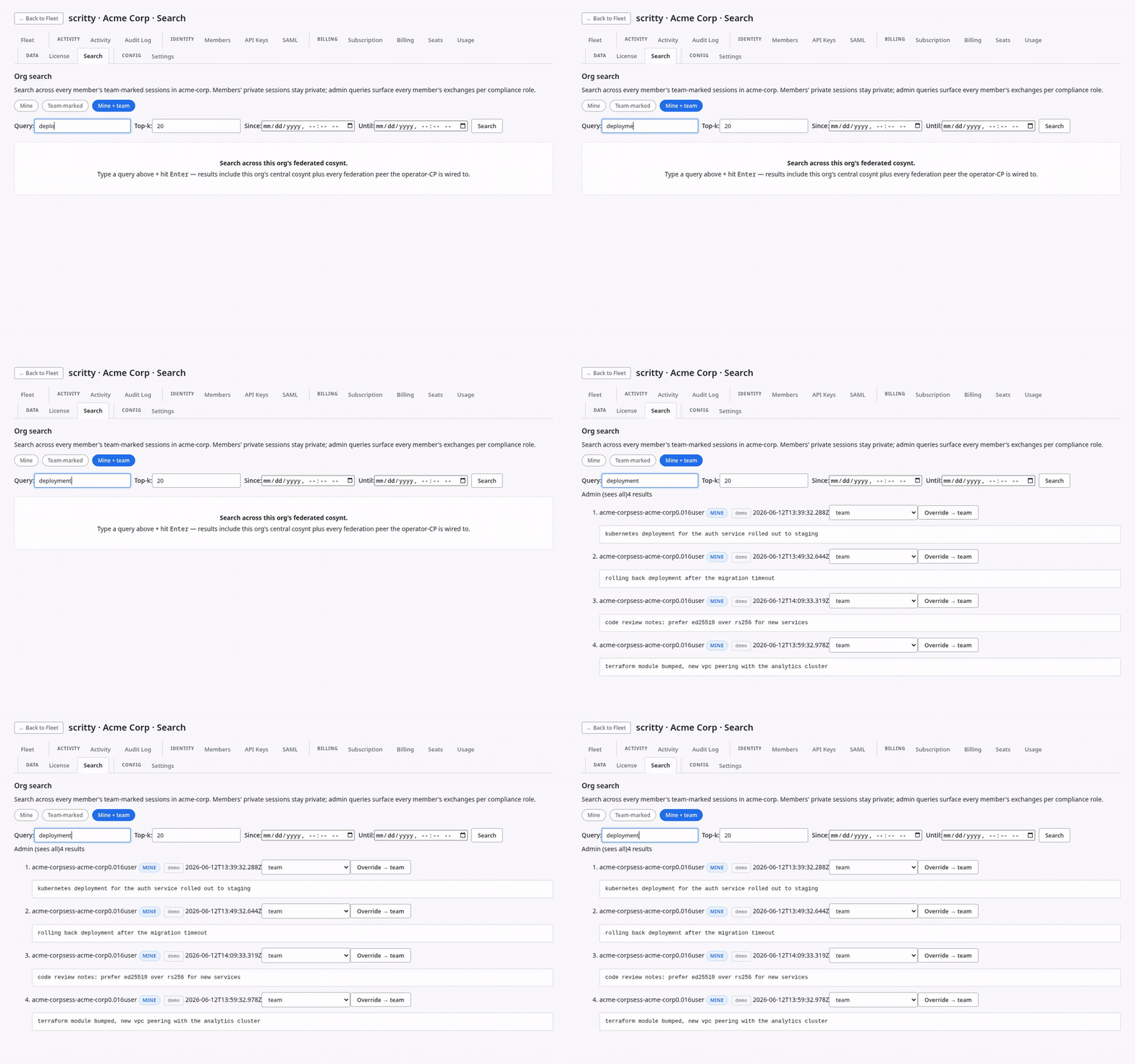
Roll scritty out to your team and every member's captures land in one control plane for your org, isolated from everyone else's. Admin search is gated by compliance role: a member's private sessions stay private, while team-marked work is searchable across the org. Members, billing, seats, audit, license, SSO and SAML are each a tab.
Local-first architecture. Paid product.
Your captures live on your machine and the data stays yours; that is the architecture, not the price. Solo devs start on Personal; teams meter federated exchange volume. There is no per-seat pricing, ever.
One dev, every supported agent, on your own machine.
Buy it once and own it forever. Runs fully local: your captures never leave your machine, and the license never contacts us -- no heartbeat, no account, no expiry, no kill switch. The same capture, dual-embedding search, MCP over stdio, and CLI the bigger tiers get, sized for one person.
Already own Personal? Year one of updates is included. After that, new builds are $39.99/yr -- optional. Let it lapse and nothing happens to the copy you own; you just stop getting newer versions.
Renew updates- Full Pro feature set on shared infra
- Converts to Pro / Pro Plus / Enterprise
- Solo dev? Download free instead
- Everything in Pro, plus SAML SSO
- 90-day audit retention
- Email and chat support
- Multi-org federation, dedicated isolation
- BYOK, custom DPA, 99.9% SLA
- Hybrid keeps captured data in your cloud
Own the entire stack. Nothing leaves your walls.
Run scritty end to end in your own environment: your infrastructure, your network, your data. No shared infra, no hybrid dependency, full data sovereignty. Built and priced for your org, your compliance posture, and your scale.
Local capture is unlimited on every paid tier. It runs on your own disk and CPU, so we never meter it -- a team should never capture less on their laptop than a solo developer does. What the numbers above size is federation: the shared central plane, cross-team search, SSO and audit. Never per seat. Start a Team Pilot - 25,000 pooled pairs or 35 days, 3+ seats.
Personal is metered by nothing at all -- it is uncapped and the license never reports anything. Letting the $39.99/yr updates lapse stops new builds being served to you and does nothing whatsoever to the copy already on your machine: it keeps capturing, searching and exporting, offline, forever. The Team Pilot is a limited-time offer and may be changed or ended at any time; ending it does not affect anyone already on an active trial.
Binary licence: Every binary distributed from scritty.dev, including the free evaluation, is provided under scritty's commercial binary-licence branch, not the AGPL source-code option. The product source is private and is not distributed. Evaluation has no expiry, pauses new capture at 25,000 exchanges, and leaves existing captures searchable and exportable. Paid binaries are governed by the applicable purchase agreement.
One terminal for every supported agent.
Every captured conversation, searchable.
Run a supported AI CLI inside scritty and it captures, tags, and indexes each attributable turn on hardware you control. You own your context; no agent gets to forget it.
- Free forever to evaluate -- 25,000 exchange-pairs, no card, no account. Personal is $99.99 once.
- Runs fully local; run Claude, Codex, Copilot, Gemini, Antigravity, Grok, or Ollama, all captured.
- Ctrl+Shift+M to search every agent, every session; MCP stdio + CLI included.
- Open the same session on your phone or any browser as a PWA.
- Free Team Pilot (3+ seats), then Pro / Pro Plus / Enterprise.
- Central Plane for shared cross-team search, self-hosted or managed.
- Per-org isolation, audit, OIDC and SAML, configurable telemetry.
- No per-seat pricing; metered by federated exchange volume. Hybrid keeps data in your cloud.